Showing posts with label Hacking tricks. Show all posts

Sunday, September 25, 2011

Unlock BSNL 3G Datacard Modem Using V-Cell


Follow The Steps

1.Uninstall BSNL 3g connecting software from control panel do not uninstall drivers ( HSDPA drivers are installed separately and do not touch them just uninstall software named bsnl3g in control panel)

2.Download and Install  V-Cell its a software just like BSNL 3g connecting software

3. Insert any Sim card with data plan and enjoy surfing

Download V-Cell.zip

Friday, September 9, 2011

Hack Microsoft Office Activation Alert : No Serial : No Patch

I will Show you how to avoid the Microsoft alert of activation. IF you have installed Microsoft office 2007/2010, with no serial key, than whenever you open any office software, you would be asked to enter activation key/serial key.

1. Install the Microsoft Office 2007/2010, with no key or serial.

2. Now, go to the C:\Program Files\Common Files\microsoft shared\OFFICE12\Office Setup Controller\Proof.en
3. Here you will find the file , named Proof.xml . Delete this file and close the folder.

4. Thats it.


Tuesday, August 9, 2011

SEND ANONYMOUS FAKE SMS WITHOUT ANY REGISTRATION (HACKERS333 XCLUSIVE)

Friendz Now U can send ANONYMOUS fake SMS to anywhere in India as TD 53733 and TM-53733 Without any registration 


Click Here and Start Sending Fake SMS

ENJOY!!!!!!!!!!!!!

Kaspersky KIV and KIS Keys 9 August 2011

How to activate Kaspersky license using a key file ;

1. Open Kaspersky License Manager

2. Click ‘Activate the application with a new license’ button. (Delete any trial key first, by clicking the red X next to the key).

3. Disable your internet connection (either disable Network adapter from control panel or turn off your modem/router).

4. Select ‘Activate commercial version’ and enter the activation license code as 11111-11111-11111-1111X
or select ‘Activate trial license’.

5. Click Next, an error dialog box will open as shown below:

6. Click Ok and you will now get the option to activate kaspersky using a key file.

7. Browse to the key location and activate kaspersky.

DOWNLOAD HERE

SIZE: 1.62 MB


Sunday, August 7, 2011

Send Unlimited Fake Emails Without Registration

Goto any of Below sites and send Unlimited Fake Emails 


http://emkei.cz


http://sms4m.tk/index.xhtml


Enter the Id of fake Sender and The reciver. Enter all the Fields like Subject and main, then send the Fake Email

Tuesday, June 21, 2011

Hack Website Using DNN [Dot Net Nuke] Exploit

Hack Website Using DNN [Dot Net Nuke] Exploit

Hack Website Using DNN [Dot Net Nuke] Exploit
SOURCE FREHACKING.NET
Note:- Only for educational purpose
Using google DORK try to find the vulnerable website.

inurl:"/portals/0"

You can also modify this google dork according to your need & requirement
I have found these 2 website vulnerable to this attack:
http://www.wittur.se/
http://www.bsd405.org/
n00bs can also try both of these websites for testing purpose.
Open the home page and check any image which is located in /portals/0/
Check the location of the image. It should be located in /portals/0/

For e.g. in case of http://www.wittur.se ..the image is located at location- http*://www.wittur.se/Portals/0/SHM.jpg*
Waaooo it means this website is vulnerable and we can change the front page pic. Now the current image name is SHM.jpg.
Rename the new image as SHM.jpg which you want to upload as a proof of you owned the system.

cont....

Now here is the exploit
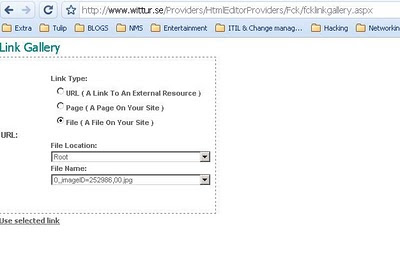
Providers/HtmlEditorProviders/Fck/fcklinkgallery.aspxHOW TO RUN ?
Simply copy paste it as shown below:
www.site.com/Providers/HtmlEditorProviders/Fck/fcklinkgallery.aspx
You will see the portal where it will ask you to upload. Select the third option File ( A File On Your Site
After selecting the third option, replace the URL bar with below script

For script click here http://tinypaste.com/af8b9

After running this JAVA script, you will see the option for Upload Selected File Now select you image file which you have renamed as SHM.jpg & upload here. Go to main page and refresh...BINGGOOOOOOOOOOOO you have hacked the website.

Sunday, June 19, 2011

Fake Mailer: How to send Anonymous Email

As we all know, Phishing is one of the most useful methods for hacking email accounts. While phishing anyone’s email account, you need to send the victim an email containing the link to your phisher page. The victim will click on this link only if he finds the mail genuine. So, we can use Fake mailer to make this mail appear genuine. I was asked by many readers to post on how to send anonymous email. In the below post, I have posted a Fake Mailer which is useful to send anonymous email to your victim.

Fake Mailer to send anonymous Email:

1. Go to Fake Mailer website to send anonymous email.
Fake Mailer

2. Now, enter the information as shown:
From Name: The Sender name which will appear on Email
From Email: The sender Email address
To: Victim email address
Subject: Subject of the Email
Content-type: Select text/html
Text: The content of your mail. Put something which will make your victim to click on your phisher link.
3. Now, enter captcha and hit on Send.
4. Your victim will receive mail like this:
How to send anonymous email

So friends, I guess this Fake Mailer is pretty easy to use and also very handy to send anonymous email to your friend or victim. If you find any problem in using this Fake Mailer to send anonymous email, please mention it in comments.
Enjoy Fake Mailer to send anonymous email…

Saturday, June 18, 2011

How to Protect Your Email Id and Facebook from Hackers

How to Protect Your Email Id and Facebook from Hackers

Everybody use email accounts and social networking websites such as orkut, twitter and facebook. There are many important information of a person in these email accounts and social networking website. so it is important to protect these account from hackers. Because hackers always try to get others account to get those secret and personal data for bad purpose. If use your email id for business and other services then it’s a great loss and trouble for you. So always try to be safe from hackers
Follow these simple steps i am writing below to protect yourself from being hacked.
* Never share your password to anyone.
* Don’t use password as your nick name, phone no. or pet names..
* Use the combination of lower case, upper case, numbers and special characters for passwords.
* Never click on any suspected link comes in a mail from unknown sender.
* Never give your passwords to any 3rd party websites for any service.
* Use different passwords for different accounts.
* Check the website url every time before login. EX: check url to be http://www.facebook.com before login to face account. Never login to website such as http://www.facebook.otherwebsit.com (MOST IMPORTANT)
* Use secondary email address and mobile phone numbers with secret questions for account recovery.
* Never use any javascript code in url while login to any of your email or any other website account. It may be a cookie stealer script.
* Use latest antivirus and antimalware softwares with firewall on.
These are some steps which you can follow for safe surfing over the internet.
Don’t give any chance to hackers…
Enjoy…….

Thursday, June 16, 2011

Denial Of Services Attacks

DOS Attacks or Denial Of Services Attack have become very common amongst Hackers who use them as a path to
fame and respect in the underground groups of the Internet. Denial of Service Attacks basically means denying valid
Internet and Network users from using the services of the target network or server. It basically means, launching an
attack, which will temporarily make the services, offered by the Network unusable by legitimate users.
In others words one can describe a DOS attack, saying that a DOS attack is one in which you clog up so much
memory on the target system that it cannot serve legitimate users. Or you send the target system data packets, which
cannot be handled by it and thus causes it to either crash, reboot or more commonly deny services to legitimate users.
DOS Attacks are of the following different types-:


1. Those that exploit vulnerabilities in the TCP/IP protocols suite.
2. Those that exploit vulnerabilities in the Ipv4 implementation.
3 There are also some brute force attacks, which try to use up all resources of the target system and make
the services unusable.
Before I go on with DOS attacks, let me explain some vulnerabilities in TCP/IP itself. Some common vulnerabilities
are Ping of Death, Teardrop, SYN attacks and Land Attacks.

Ping of Death

This vulnerability is quite well known and was earlier commonly used to hang remote systems (or even force them to
reboot) so that no users can use its services. This exploit no longer works, as almost all system administrators would
have upgraded their systems making them safe from such attacks.
In this attack, the target system is pinged with a data packet that exceeds the maximum bytes allowed by TCP/IP,
which is 65 536. This would have almost always caused the remote system to hang, reboot or crash. This DOS attack
could be carried out even through the command line, in the following manner:
The following Ping command creates a giant datagram of the size 65540 for Ping. It might hang the victim's
computer:
C:\windows>ping -l 65540
 

Teardrop


The Teardrop attack exploits the vulnerability present in the reassembling of data packets. Whenever data is being
sent over the Internet, it is broken down into smaller fragments at the source system and put together at the
destination system. Say you need to send 4000 bytes of data from one system to the other, then not all of the 4000
bytes is sent at one go. This entire chunk of data is first broken down into smaller parts and divided into a number of packets, with each packet carrying a specified range of data. For Example, say 4000 bytes is divided into 3 packets,
then:
The first Packet will carry data from 1 byte to 1500 bytes
The second Packet will carry data from 1501 bytes to 3000 bytes
The third packet will carry data from 3001 bytes to 4000 bytes
These packets have an OFFSET field in their TCP header part. This Offset field specifies from which byte to which
byte does that particular data packet carries data or the range of data that it is carrying. This along with the sequence
numbers helps the destination system to reassemble the data packets in the correct order. Now in this attack, a series
of data packets are sent to the target system with overlapping Offset field values. As a result, the target system is not
able to reassemble the packets and is forced to crash, hang or reboot.
Say for example, consider the following scenario-: (Note: _ _ _ = 1 Data Packet)
Normally a system receives data packets in the following form, with no overlapping Offset values.

(1 to 1500 bytes) (1501 to 3000 bytes) (3001 to 4500 bytes)

Now in a Teardrop attack, the data packets are sent to the target computer in the following format: (1 to 1500 bytes) (1500 to 3000 bytes) (1001 to 3600 bytes)
When the target system receives something like the above, it simply cannot handle it and will crash or hang or reboot.
 

SYN Attack

The SYN attack exploits TCP/IP's three-way handshake. Thus in order to understand as to how SYN Attacks work,
you need to first know how TCP/IP establishes a connection between two systems. Whenever a client wants to
establish a connection with a host, then three steps take place. These three steps are referred to as the three-way
handshake.
In a normal three way handshake, what happens is that, the client sends a SYN packet to the host, the host replies to
this packet with a SYN ACK packet. Then the client responds with a ACK (Acknowledgement) packet. This will be
clearer after the following depiction of these steps-:
1. Client --------SYN Packet--------------à Host
In the first step the client sends a SYN packet to the host, with whom it wants to establish a three-way connection.
The SYN packet requests the remote system for a connection. It also contains the Initial Sequence Number or ISN of
the client, which is needed by the host to put back the fragmented data in the correct sequence.
2. Host -------------SYN/ACK Packet----------à Client
In the second step, the host replies to the client with a SYN/ACK packet. This packet acknowledges the SYN packet
sent by the client and sends the client its own ISN.
3. Client --------------ACK-----------------------
à Host
In the last step the client acknowledges the SYN/ACK packet sent by the host by replying with a ACK packet.
These three steps together are known as the 3-way handshake and only when they are completed is a complete TCP/
IP connection established.
In a SYN attack, several SYN packets are sent to the server but all these SYN packets have a bad source IP Address.
When the target system receives these SYN Packets with Bad IP Addresses, it tries to respond to each one of them
with a SYN ACK packet. Now the target system waits for an ACK message to come from the bad IP address.
However, as the bad IP does not actually exist, the target system never actually receives the ACK packet. It thus
queues up all these requests until it receives an


Land Attacks


A Land attack is similar to a SYN attack, the only difference being that instead of a bad IP Address, the IP address of
the target system itself is used. This creates an infinite loop between the target system and the target system itself.
However, almost all systems have filters or firewalls against such attacks.

Smurf Attacks

A Smurf attack is a sort of Brute Force DOS Attack, in which a huge number of Ping Requests are sent to a system
(normally the router) in the Target Network, using Spoofed IP Addresses from within the target network. As and
when the router gets a PING message, it will route it or echo it back, in turn flooding the Network with Packets, and
jamming the traffic. If there are a large number of nodes, hosts etc in the Network, then it can easily clog the entire
network and prevent any use of the services provided by it.

UDP Flooding

This kind of flooding is done against two target systems and can be used to stop the services offered by any of the
two systems. Both of the target systems are connected to each other, one generating a series of characters for each
packet received or in other words, requesting UDP character generating service while the other system, echoes all
characters it receives. This creates an infinite non-stopping loop between the two systems, making them useless for
any data exchange or service provision


Distributed DOS Attacks


DOS attacks are not new; in fact they have been around for a long time. However there has been a recent wave of
Distributed Denial of Services attacks which pose a great threat to Security and are on the verge of overtaking Viruses/Trojans to become the deadliest threat to Internet Security. Now you see, in almost all of the above TCP/IP
vulnerabilities, which are being exploited by hackers, there is a huge chance of the target's system administrator or
the authorities tracing the attacks and getting hold of the attacker.
Now what is commonly being done is, say a group of 5 Hackers join and decide to bring a Fortune 500 company's
server down. Now each one of them breaks into a smaller less protected network and takes over it. So now they have
5 networks and supposing there are around 20 systems in each network, it gives these Hackers, around 100 systems
in all to attack from. So they sitting on there home computer, connect to the hacked less protected Network, install a
Denial of Service Tool on these hacked networks and using these hacked systems in the various networks launch
Attacks on the actual Fortune 500 Company. This makes the hackers less easy to detect and helps them to do what
they wanted to do without getting caught. As they have full control over the smaller less protected network they can
easily remove all traces before the authorities get there.
Not even a single system connected to the Internet is safe from such DDOS attacks. All platforms Including Unix,
Windows NT are vulnerable to such attacks. Even MacOS has not been spared, as some of them are being used to
conduct such DOS attacks..

So this was a short tutorial on DOS attack... keep learning

Tuesday, June 14, 2011

Tutorial On DNS Poisoning


Tutorial On DNS Poisoning

Tutorial On DNS Poisoning
This is an introduction to DNS poisoning which also includes an example of quite a nifty application of it using the IP Experiment. It’s purely educational, so I’m not responsible for how you use the information in it.
To start, you’ll need
• A computer running Linux (Ubuntu in my case)
• A basic understanding of how the Domain Name System (DNS) works.
Note that this is a more advanced topic; don’t try this if you don’t know what you’re doing.
Why DNS?
The DNS provides a way for computers to translate the domain names we see to the physical IPs they represent. When you load a webpage, your browser will ask its DNS server for the IP of the host you requested, and the server will respond. Your browser will then request the webpage from the server with the IP address that the DNS server supplied.
Here’s a pretty diagram to help explain it
If we can find a way to tell the client the wrong IP address, and give them the IP of a malicious server instead, we can do some damage.
Malicious DNS Server
So if we want to send clients to a malicious web server, first we need to tell them its IP, and so we need to set up a malicious DNS server.
The server I’ve selected is dnsmasq – its lightweight and the only one that works for this purpose (that I’ve found)
To install dnsmasq on Ubuntu, run sudo apt-get install dnsmasq, or on other distributions of Linux, use the appropriate package manager.
Once you’ve installed it you can go and edit the configuration file (/etc/dnsmasq.conf)
sudo gedit /etc/dnsmasq.conf
The values in there should be sufficient for most purposes. What we want to do is hard-code some IPs for certain servers we want to spoof
The format for this is address=/HOST/IP
So for example;
address=/facebook.com/63.63.63.63
where 63.63.63.63 is the IP of your malicious web server
Save the file and restart dnsmasq by running
sudo /etc/init.d/dnsmasq restart
You now have a DNS server running which will redirect requests for facebook.com to 63.63.63.63
Malicious Web Server
You probably already have a web server installed. If not, install apache. This is pretty basic, so I won’t cover it here.
There are a couple of things you can do with the web server. It will be getting all the traffic intended for the orignal website, so the most likely cause of action would be to set up some sort of phishing site
I’ll presume you know how to do that though
Another alternative is to set up some sort of transparent proxy which logs all activity. I might come back to this in the future.
I Can Be Ur DNS Server Plz?
An alternative is to, instead of a spoof webserver, set up a Metasploit browser_autopwn module . You can have lots of fun with that
But how do you get a victim? Well this is where my project, the IP Experiment could come in handy
If you don’t know, the IP Experiment basically harvests people’s IPs through websites such as forums and scans them for open ports. A surprising number of these IPs have port 80 open and more often that not, that leads straight to a router configuration mini-site. ‘Admin’ and ‘password’ will get you far in life; its fairly easy to login and change the DNS settings, and BOOM. You have a victim!
The same techniques can be applied to in many different ways.
Enjoy…….